
Kraken account restricted: what the official page says and what to do
Published: Official pages last read: Editorial policy
Kraken's help page says temporary restrictions keep accounts secure and meet legal and regulatory requirements, and that most are lifted after a review that usually takes 10 to 14 business days. Kraken may not share the exact reason. Look for its request by email and in the app, answer it completely in one go and contact chat support only after the stated period.
We are independent of Kraken and not affiliated with it. We cannot influence its decisions, and nothing on this page is an official statement of Kraken.
Questions about your case? Message us:
What the platform's own pages say
- Kraken says it places temporary restrictions on accounts to keep them secure and to meet legal and regulatory requirements, and that deposits or withdrawals may be unavailable until a review is complete. [1]
- The page says most restrictions are lifted when the review finishes and that this usually takes 10 to 14 business days, longer when Kraken is busy. [1]
- Kraken says it may not always be able to share the exact reason for a restriction, and lists unusual sign-in or activity, out-of-date or incomplete information, a payment reversal, legal and regulatory requirements and activity that breaks its terms as common reasons. [1]
- In many cases the page says Kraken completes the review without needing anything from the client, and if it needs more it sends an email and an in-app notification. [1]
- The page advises completing any request in full and in one go with clear, up-to-date documents, and warns that partial answers can add days to the review. [1]
- If more than 14 business days pass with no word from Kraken, the page says to reach out through chat support. [1]
- Kraken says it will never call or email to ask for login details or remote access to your device, and tells clients who think they were scammed to stop sending money and contact their bank and the authorities. [1]
- Kraken's scam page says crypto transactions are irreversible, that Kraken cannot recover funds sent to a scammer, and that offers to get your money back are almost always a second scam, often with an upfront fee. [2]
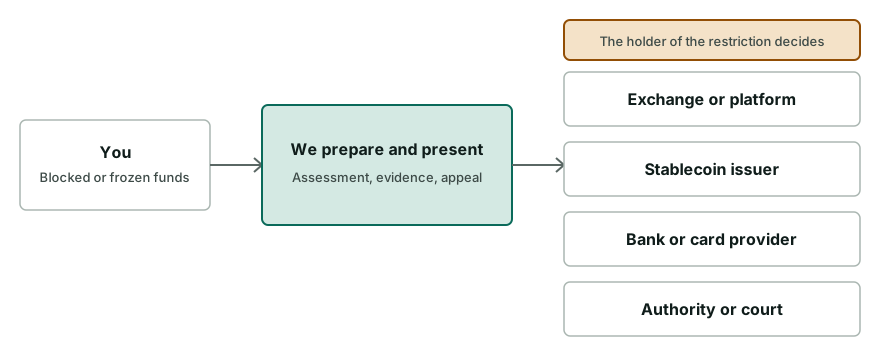
Typical restrictions
| Type of restriction | What it means |
|---|---|
| Identity or details update requested | Kraken may ask you to confirm that your identity or contact information is current, sometimes because local regulation requires it. You complete this in the app or on the website. |
| Deposits and withdrawals paused | Fiat or crypto deposits and withdrawals can be paused until the review ends. Kraken says to check email and notifications and answer any request quickly. |
| Withdrawal on hold or declined | A withdrawal may be reviewed as part of security and regulatory checks, and transfers to wallets linked to prohibited activity may be declined, according to the page. |
| Payment reversal | A chargeback or reversal by your bank or card issuer can add restrictions and leave a negative balance, which you can cover by depositing funds or selling crypto. |
| Possible scam exposure | Kraken may restrict features when activity matches common scam patterns, to protect the account. The page points to separate guidance about protective measures. |
What you can do, step by step
- Find Kraken's request
Look for an email from Kraken, including the spam folder, and for notifications in the app or on the website. Check that the email really comes from Kraken before you act on it.
- Complete it in full, once
Upload clear, current documents and answer every question in a single submission. The page warns that partial answers can add days to the review.
- Report any payment reversal
If your bank or card issuer reversed a recent payment, say so and follow Kraken's chargeback guidance to clear the balance owed.
- Check your account details
Make sure the account is fully verified, your contact details are current and you live in a country where Kraken is available.
- Secure the account if access looks suspicious
Reset the password, remove devices you do not recognise, check that two-factor authentication is on and review recent transactions for anything unfamiliar.
- Wait for the review, then use chat support
The page says reviews usually take 10 to 14 business days. If more than 14 business days pass with no word, contact Kraken through chat support.
What to prepare
- A valid government photo ID that is clear and not expired
- Proof of address if Kraken asks for it
- Screenshots of Kraken's request and the restriction message with dates
- Bank or card records if a payment reversal is involved
- Details of any recent scam contact, such as messages, addresses and transaction hashes
- A short written timeline of your recent deposits, withdrawals and logins
Pitfalls and scams to avoid
- Never share your password, two-factor codes, seed phrase or private keys with anyone who offers to speed up a review.
- Unsolicited messages offering to unlock or speed up a review are a warning sign. Use only Kraken's own app, website and help centre.
- Do not send partial answers or several uploads. The page says incomplete replies can add days.
- If you were guided into moving funds by someone, stop all contact with them and do not send more money.
- Kraken says it has no recovery, asset recovery or fund release team. Treat any contact claiming to be from one as a scam, and never pay an upfront fee for recovery.
When outside help makes sense
- More than 14 business days have passed and chat support cannot explain the delay
- A scam-related restriction applies and you need evidence organised for the police and the platform
- A reversed payment left a balance you cannot clear and access is still blocked
- A large balance is involved and your answers have been rejected
Questions people ask
Why is my Kraken account restricted?
Kraken's page lists unusual activity, incomplete or outdated information, a payment reversal, legal and regulatory requirements and activity that breaks its terms. It also says it may not share the exact reason, so check your email and the app for its request.
How long does a Kraken restriction last?
Kraken's help page says most restrictions are lifted after a review that usually takes 10 to 14 business days from the date of the restriction, and that it can take longer when Kraken is busy.
Do I have to do anything during the review?
Often not. The page says Kraken completes many reviews without needing anything from you. If it does need information, it emails you and sends an in-app notification, and a prompt, complete reply helps.
What should I do if I think I was scammed?
The page says to stop sending money, contact your bank or payment provider, report the scam to Kraken and to your local authorities. It also advises ending contact with anyone who guided you into moving funds.
Why did a chargeback restrict my account?
Kraken says crypto purchases cannot be refunded or reversed, so a reversal by your bank or card issuer can add restrictions until the balance owed is cleared. It describes depositing funds or selling crypto as ways to cover it.
When should I contact Kraken support?
The page says to reach out through chat support if you have not heard from Kraken and more than 14 business days have passed since the restriction. Reply to any request from Kraken as soon as you can.
Is this page from Kraken?
No. We are independent of Kraken and not affiliated with it. We summarise Kraken's own help page, link to it and cannot influence any decision about your account.
Can Kraken recover crypto I lost to a scam?
Kraken's scam page says it cannot reverse or recall a completed transaction or recover funds sent to a scammer. It says it can investigate activity on your own account, help secure it and respond to lawful law enforcement requests to freeze funds held with it.
Related services
- Exchange account unblocking. Understand the freeze, prepare KYC/AML evidence, answer compliance and appeal.
- Crypto freeze diagnosis. Work out who froze your funds and what can realistically be done next.
- Crypto scam recovery support. Calm help after a crypto scam: assess, document, trace and send freeze requests.
Read next
Official pages read
Official or authoritative pages this page is based on. Pages change, so check the source for the current wording.
- Why is my account restricted? · Kraken
- Can I recover crypto lost to a scam? · Kraken
Information on this page is general and not legal advice.